How Leadwerks Encrypts Its ZIP Archives
Taking a closer look at how Leadwerks encrypts its archives and how extraction works.

Introduction
I came across this while reading a thread on ResHax about data.pak from Lone Water: Prologue v0.9.8. The archive looked like a normal ZIP file, but its contents were encrypted and the usual password-recovery methods were not getting anywhere. That made me want to poke around a bit.
The game was built with Leadwerks, so I opened the binary in IDA to see how it handles the ZIP file. There isn’t one password for the whole archive. Leadwerks generates a different one on the fly for each file.
What follows is how I traced the password generation back through the game and used it to recover the files.
Taking a first look at data.pak
Before opening the executable, I had a quick look at the archive itself to see what I could figure out. The .pak extension is a bit misleading. The file starts with 50 4B 03 04, which is the standard ZIP local file header. 7-Zip opens the archive and lists the files fine, but trying to extract anything prompts for a password.
The ZIP headers show that every entry has the encryption flag set and uses standard Deflate compression. There is no custom archive format involved here, so the main task is just figuring out where the game gets the password for each file.
 Figure 1. The ZIP local file header stores the general-purpose bit flag as
 01 00 (0x0001 in little-endian). Bit 0 is set, marking the entry as encrypted.
Since the password is not stored in the ZIP headers, the next step was to trace it through the main executable.
Finding where Leadwerks opens the archive
I loaded the game executable into IDA and started around the archive-handling code. The MiniZip symbols were stripped, so my first useful anchor was the set of constants used by ZipCrypto’s init_keys routine: 0x12345678, 0x23456789, and 0x34567890.
Searching for those constants quickly led to a small function that sets up the three keys and then updates them for each byte of the password.
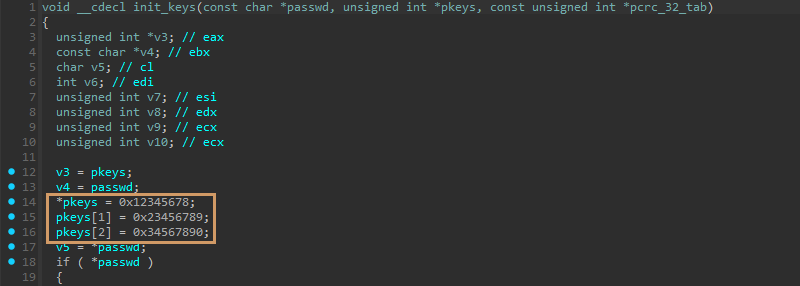 Figure 2. MiniZip’s
 init_keys routine initializes the three ZipCrypto keys before processing the supplied password.
Matching the routine against MiniZip confirmed it as init_keys. Following its cross-reference led to unzOpenCurrentFile3. The password handling sits near the end of the function. If a password is present, MiniZip initializes the keys, reads and decrypts the 12-byte encryption header, then moves the input position past it.
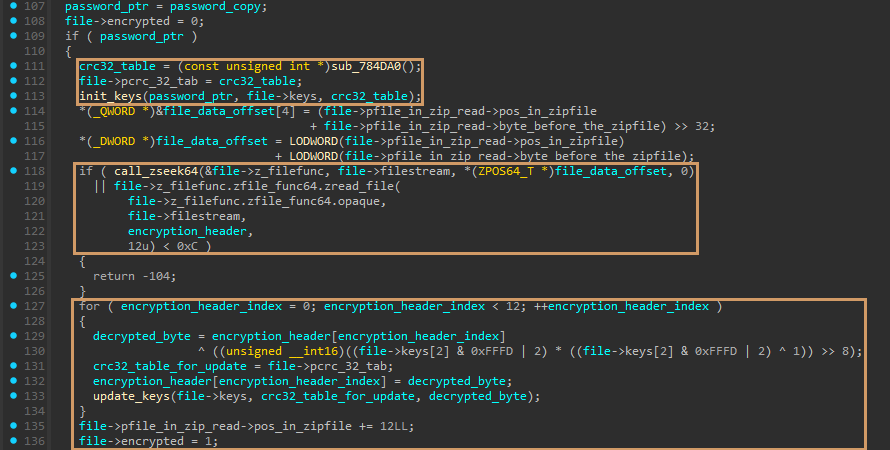 Figure 3. Password handling inside
 unzOpenCurrentFile3. MiniZip initializes the ZipCrypto keys, reads and decrypts the 12-byte encryption header, then marks the entry as encrypted.
MiniZip itself is not doing anything unusual here. unzOpenCurrentFile3 receives a password, initializes the standard ZipCrypto state, and decrypts the 12-byte encryption header before the entry is read. That leaves the obvious question: where does Leadwerks get the password from?
Following unzOpenCurrentFilePassword back into the game code led to a Leadwerks routine that I renamed Leadwerks_ReadArchiveEntry based on its behavior. The function locates the requested ZIP entry, reads its file info, checks bit 0 of the general-purpose flag, and only supplies a password when that bit is set.
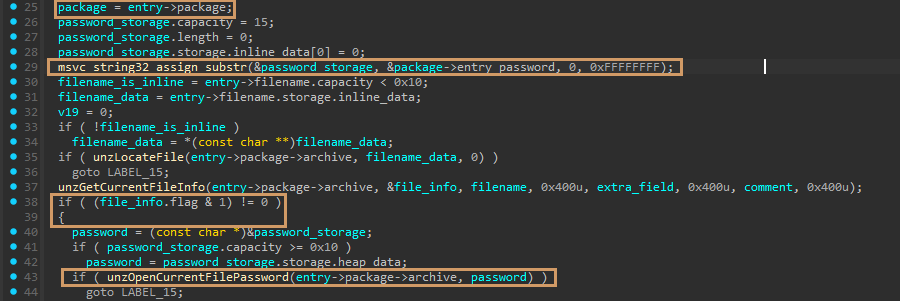 Figure 4.
 Leadwerks_ReadArchiveEntry copies the password from the owning package, checks bit 0 of the entry flags, and passes the password to unzOpenCurrentFilePassword.
The MiniZip side ends here. The password is already present in package->entry_password before the entry is opened. The next step is to trace that field back and find where Leadwerks generates its value.
Deriving the per-entry password
Tracing package->entry_password back led to the larger asset-loading routine, which I renamed Leadwerks_LoadAssetData based on what it does. At this point, the field already contains the output of the first XOR stage. Leadwerks XORs that value with build_mask, then writes the result back into the same field before reading the archive entry.
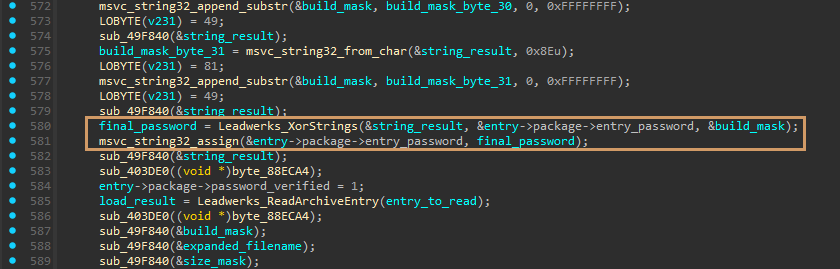 Figure 5. The first-stage value in
 package->entry_password is XORed with build_mask. The result is written back to the same field before Leadwerks reads the archive entry.
Leadwerks_XorStrings is another name I added based on the function’s behavior. The routine copies the input string, walks it byte by byte, and XORs each byte with key[i % key->length]. If the key is shorter than the input, it simply repeats.
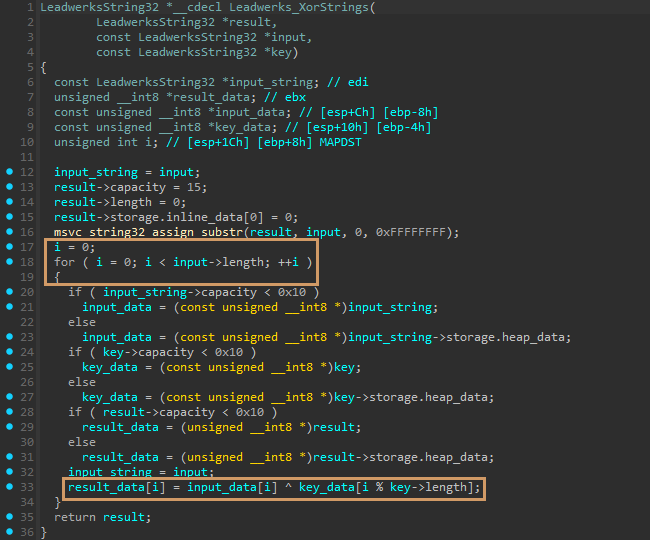 Figure 6.
 Leadwerks_XorStrings copies the input and XORs each byte with a repeating key.
Back in Leadwerks_LoadAssetData, the first XOR stage uses expanded_filename as the input and size_mask as the repeating key. The result is copied into package->entry_password and later XORed with build_mask and written back to the same field.
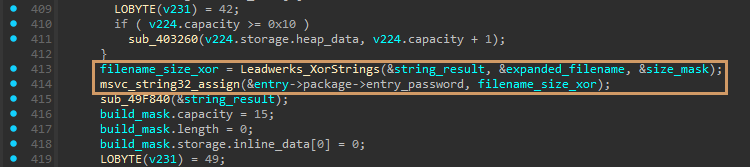 Figure 7. The first XOR stage combines
 expanded_filename with the repeating size_mask, then stores the intermediate result in package->entry_password.
The size_mask comes from the current ZIP entry. Leadwerks converts entry->uncompressed_size to decimal text, then appends a period, a space, and an underscore. An uncompressed size of 1234, for example, produces 1234. _.
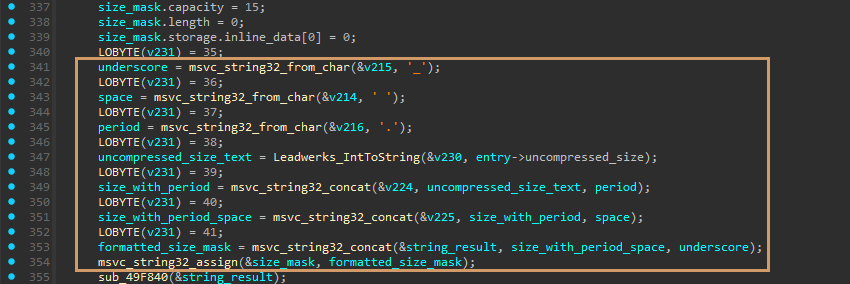 Figure 8. Leadwerks converts the entry’s uncompressed size to decimal text and appends
 . _ to build the repeating size_mask.
expanded_filename starts as the archive entry’s filename. While the string is shorter than 32 bytes, Leadwerks appends the marker bytes 2D 39 C2 followed by another copy of the current value. Each pass effectively produces value + 2D 39 C2 + value. The result is not truncated once it reaches 32 bytes.
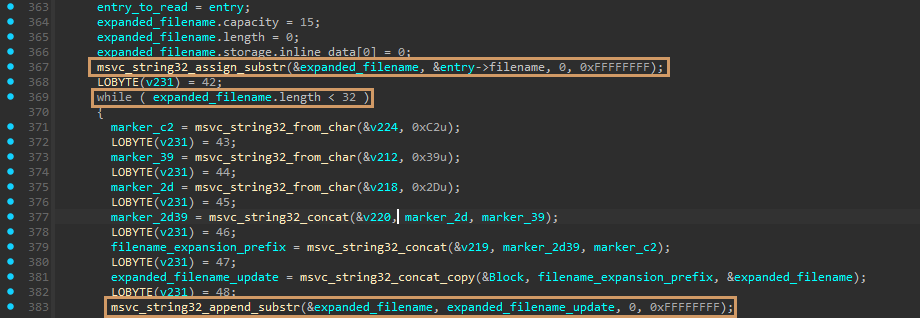 Figure 9. Leadwerks starts with the archive entry name, then repeatedly appends
 2D 39 C2 and another copy of the current value until the string reaches at least 32 bytes.
The second XOR key is fixed in this game build. Leadwerks constructs build_mask one byte at a time inside Leadwerks_LoadAssetData. The complete 32-byte value is:
1
2
3
4
22 80 3E 61 22 4B 54 20
54 15 25 08 E3 10 A9 24
16 AE 8A BF A3 34 0A 30
B3 80 DB 8F 62 1C B1 8E
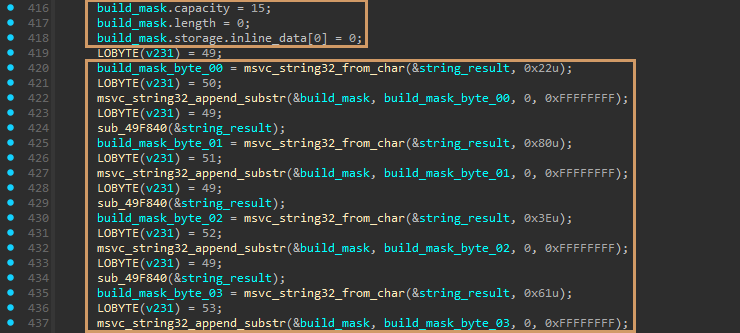 Figure 10.
 Leadwerks_LoadAssetData constructs the fixed build_mask one byte at a time.
With both XOR stages accounted for, the password routine reduces to this. Raw filename bytes from the ZIP central directory go in. No case conversion, slash normalization, or text decoding.
1
2
3
4
5
6
7
8
9
10
11
12
13
14
15
16
17
18
19
20
21
22
23
24
build_mask = bytes.fromhex(
    "22 80 3E 61 22 4B 54 20"
    "54 15 25 08 E3 10 A9 24"
    "16 AE 8A BF A3 34 0A 30"
    "B3 80 DB 8F 62 1C B1 8E"
)

def derive_password(filename: bytes, uncompressed_size: int) -> bytes:
    expanded = bytearray(filename)

    while len(expanded) < 32:
        previous = bytes(expanded)
        expanded += b"\x2D\x39\xC2" + previous

    size_mask = f"{uncompressed_size}. _".encode("ascii")

    password = bytes(
        value
        ^ size_mask[i % len(size_mask)]
        ^ build_mask[i % len(build_mask)]
        for i, value in enumerate(expanded)
    )

    return password.split(b"\x00", 1)[0]
The result is a binary password, not necessarily printable text. MiniZip receives it as a null-terminated C string, so the first 00 byte marks the end of the password.
Checking the result against data.pak
The reconstructed routine looked right in IDA, but I wanted to check it against an actual archive entry. I opted for Scripts/Main.lua.
The filename is 16 bytes long, so one expansion pass produces a 35-byte value. Its uncompressed size is 5346, giving a size mask of 5346. _. After both XOR stages, the first null byte appears at offset 34, leaving this 34-byte password:
1
2
3
4
5
44 D0 78 3E 7C 1F 78 3A
2A 40 7A 48 ED 23 E9 76
0F A1 66 CC 9F 73 50 74
F1 DD D4 9D 36 46 EB 96
60 D5
Passing those bytes to standard ZipCrypto produced the complete 5,346-byte Lua file. Its CRC-32 was 1D6438C6, matching the value stored in the central directory. The recovered file begins with:
1
2
3
4
5
6
7
8
9
10
11
12
13
import "Addons/THUI/THUI.lua"

-- global vars for footsteps
watersfxfloor = false

-- global to exit game
paused = false
exit_game = false

-- global to end game state
game_end = false

...
Extracting data.pak
At this point, there is nothing custom left to handle. All 892 entries in this version of data.pak use Deflate, and every filename is ASCII. Python’s zipfile module already takes care of the ZipCrypto header, decompression, and CRC checking. The only extra step is deriving the correct password for each entry.
The complete extraction script:
1
2
3
4
5
6
7
8
9
10
11
12
13
14
15
16
17
18
19
20
21
22
23
24
25
26
27
28
29
30
31
32
33
34
35
36
37
38
39
from pathlib import Path
from zipfile import ZipFile

build_mask = bytes.fromhex(
    "22 80 3E 61 22 4B 54 20"
    "54 15 25 08 E3 10 A9 24"
    "16 AE 8A BF A3 34 0A 30"
    "B3 80 DB 8F 62 1C B1 8E"
)

def derive_password(filename: bytes, uncompressed_size: int) -> bytes:
    expanded = bytearray(filename)

    while len(expanded) < 32:
        previous = bytes(expanded)
        expanded += b"\x2D\x39\xC2" + previous

    size_mask = f"{uncompressed_size}. _".encode("ascii")

    password = bytes(
        value
        ^ size_mask[i % len(size_mask)]
        ^ build_mask[i % len(build_mask)]
        for i, value in enumerate(expanded)
    )

    return password.split(b"\x00", 1)[0]

script_directory = Path(__file__).resolve().parent
archive_path = script_directory / "data.pak"
output_path = script_directory / "data_extracted"

with ZipFile(archive_path) as archive:
    for entry in archive.infolist():
        filename = entry.filename.encode("ascii")
        password = derive_password(filename, entry.file_size)

        archive.extract(entry, output_path, pwd=password)
        print(entry.filename)
zipfile validates the CRC-32 while reading each entry, so an incorrect password or damaged payload stops the extraction. Running the script against this archive recovered all 892 files.
Downloads
Download the script, place it in the same folder as data.pak, and run it with Python. The extracted files will be saved under data_extracted.
Download: lone_water_data_pak_extract.py
Closing Notes
So that was data.pak. What looked like a normal password-protected ZIP was not something that needed to be brute-forced. The game already had everything required to generate each password. The filename and file size came from the archive, and the remaining mask was sitting in the executable.
Once I had the routine written down, extracting the archive only needed a small Python script. All 892 entries came out cleanly, with the normal ZIP CRC checks confirming the results.
If I come across another Leadwerks archive, the fixed 32-byte mask is the first thing I would check. The rest of the routine may be the same, but I would not count on those bytes being reused.