A Closer Look at Disney Dreamlight Valley’s Save Encryption
Finding the profile key, unpacking the save and building a file Disney Dreamlight Valley accepts.

Introduction
I ran into this ResHax post while looking for something new to take apart. The question was whether a Dreamlight Valley save could be decrypted, edited and encrypted again.
I opened profile.json expecting, well, JSON. It was just binary data. keychain.json sat next to it and was perfectly readable, so that was my first lead. I had no idea yet whether the two files were actually connected.
For now I kept the target small. Pull out the JSON, change one or two values, rebuild the file and see what the game did with it.
Inspecting profile.json
I did this analysis against game version 1.24.13.33.
Before touching IDA, I opened both files from the save folder. The first byte in profile.json was not {. Scrolling through it did not reveal field names or a header I knew. The file I tested came out to 133,584 bytes. Dividing that by 16 left no remainder. Block encryption seemed possible. Nothing more than that yet.
keychain.json opened as ordinary JSON. I saw device and account identifiers in there, but no obvious block of key material. Maybe the value was encoded or assembled somewhere else. I kept the file in mind and switched to the game code.
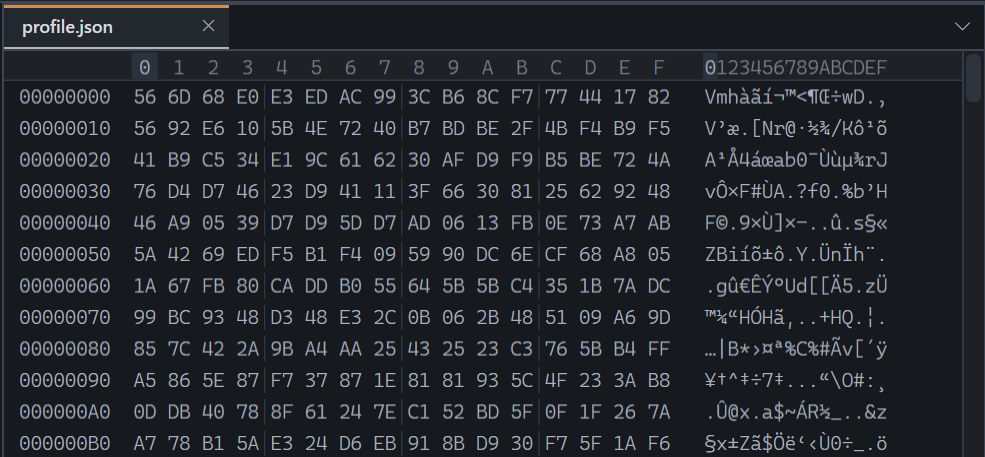 Figure 1. The first bytes of
 profile.json in the hex editor.
Following profile.json into the game
Next I opened GameAssembly.dll in IDA. With the IL2CPP metadata from global-metadata.dat applied, I could follow the managed method names into the native code. Meta_ProfileUtil_LoadProfileBytes was the first useful stop.
LoadProfileBytes hands the input byte array to Meta_ProfileUtil_TryDecryptProfile. On success, it sends the returned text to Meta_ProfileUtil_LoadProfileJson. Whatever wraps the JSON has already been removed before the parser sees it.
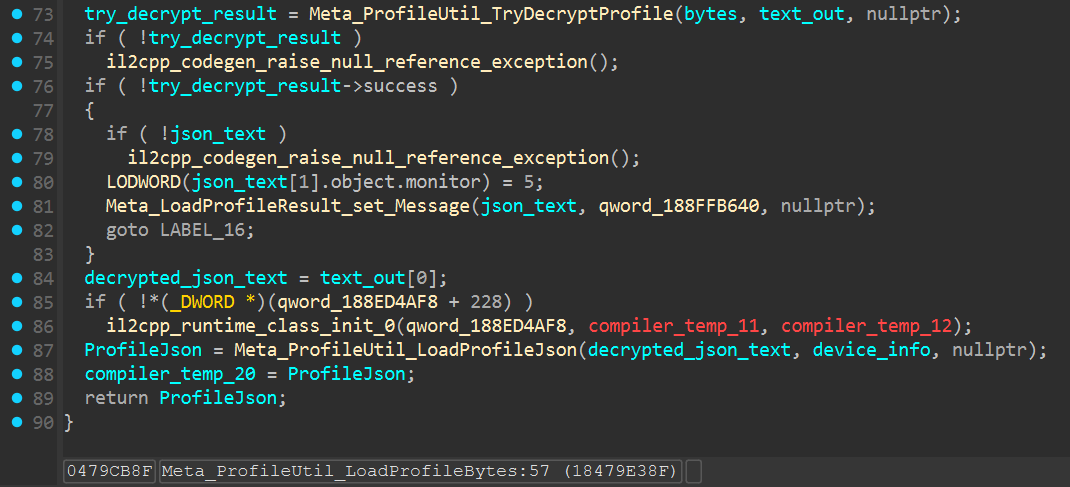 Figure 2. The calls to
 TryDecryptProfile and LoadProfileJson inside Meta_ProfileUtil_LoadProfileBytes.
How profile.json is decrypted
Inside Meta_ProfileUtil_TryDecryptProfile, the normal encrypted branch gets a DDVCommon_Security object and runs the full input array through its decryptor. The returned bytes then go to Meta_ProfileUtil_DecompressProfile, followed by UTF8.GetString. Decrypt, unpack, decode. That was the read order.
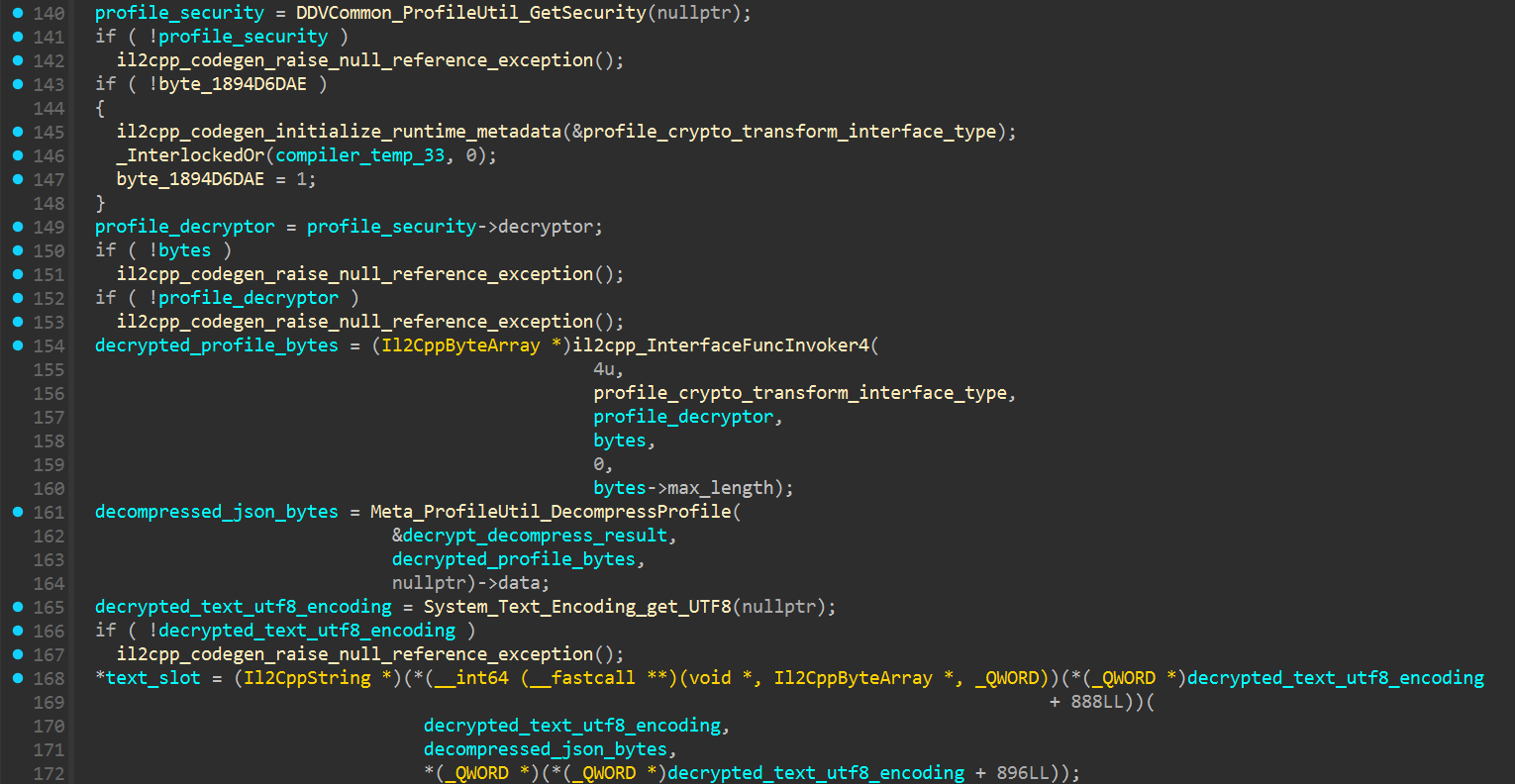 Figure 3. The decryptor call, decompression call and UTF-8 conversion inside
 TryDecryptProfile.
GetSecurity was small enough to read in one screen. It checks a static slot, creates DDVCommon_Security when that slot is empty and keeps the object for later calls. The constructor argument was still named profile_aes_key_literal, a name I had added in IDA. I needed to resolve the original metadata value behind it.
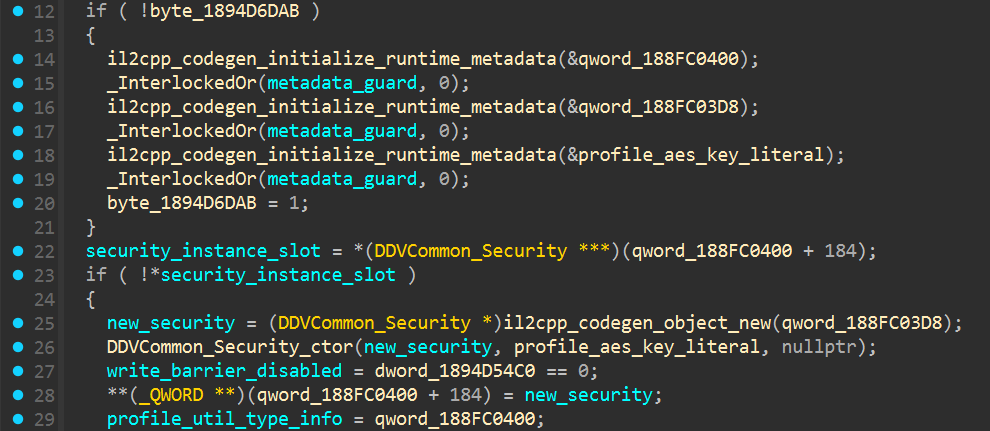 Figure 4.
 GetSecurity creating DDVCommon_Security with profile_aes_key_literal.
The name was mine. The value was not. In Cpp2IL’s ISIL dump, the original qword_188FC03E8 slot resolves to a string that is moved into RDX immediately before the constructor call:
1
2
3
4
5
021 Move rdx, "b5qhh8saJ8UlDJUzTZXd2Tg6mbo8W8n5"
022 Move r8, 0
023 Move rcx, rax
024 Move rbx, rax
025 Call Security..ctor, rcx, rdx
At the call, RCX holds the new Security object and RDX holds its encrypt_key argument. That tied the metadata string to the constructor for this build.
I moved into the constructor next. encrypt_key goes straight into UTF8.GetBytes. The returned array is 32 bytes and is assigned through the RijndaelManaged.Key setter. A little farther down, the Mode and Padding setters both receive 2. In their .NET enums, that is ECB and PKCS7. I did not find any IV setup. ECB does not use one.
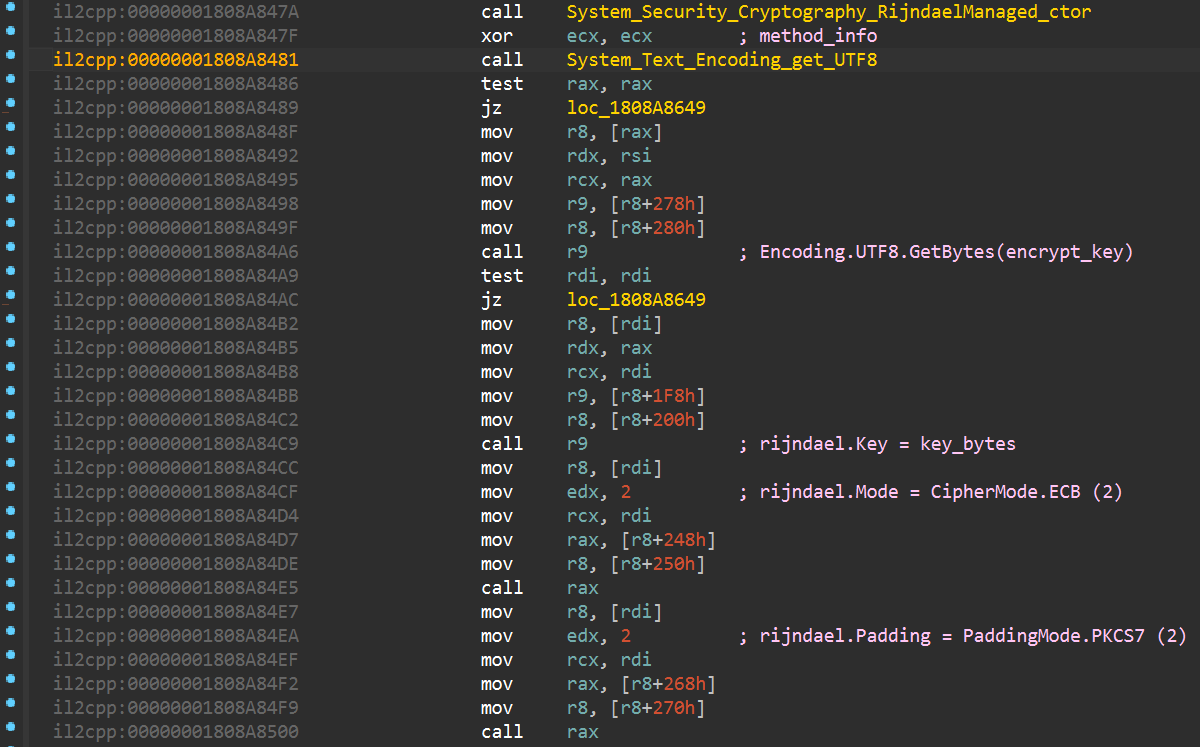 Figure 5. The key, mode and padding assignments inside
 DDVCommon_Security_ctor.
What the decrypted buffer contains
After decryption, the game passes the byte array to glPlayFab_Compression_DecompressZip. The helper wraps it in a ZipArchive, checks that the archive has one entry and allocates an output array from that entry’s uncompressed length. It then opens the entry stream and reads its contents.
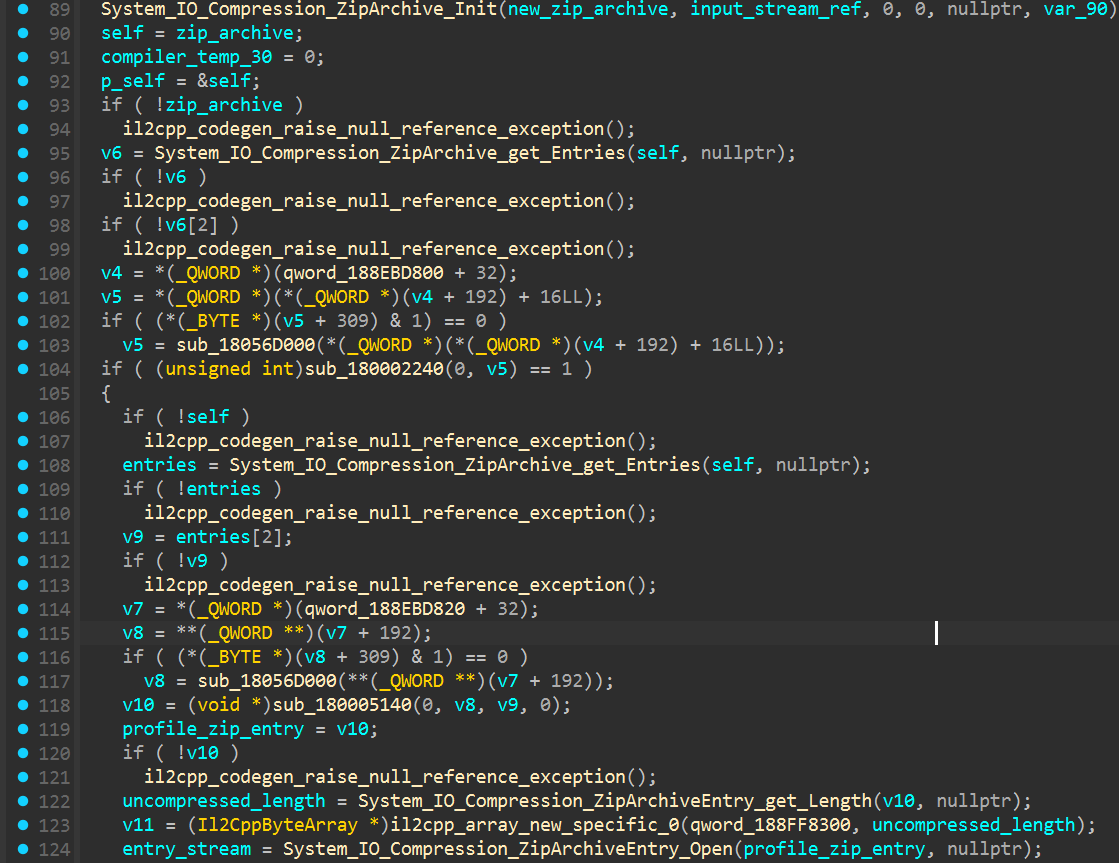 Figure 6. The entry-count check, output allocation and entry-stream call in
 glPlayFab_Compression_DecompressZip.
I made a duplicate of profile.json and decrypted that next. After removing the PKCS#7 padding, I saw 50 4B 03 04 at offset zero. The buffer opened as a ZIP and held one entry named profile, matching the branch in the game code.
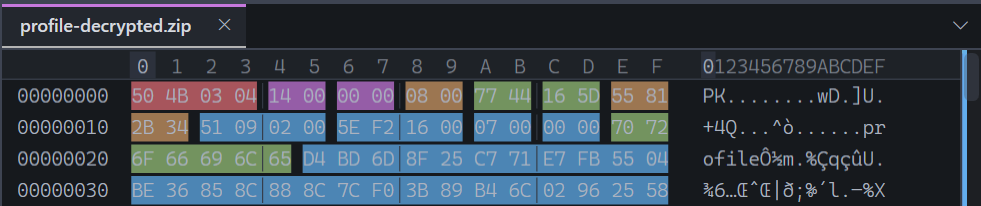 Figure 7. The first bytes of the decrypted buffer and the
 profile entry name.
Extracting profile left me with ordinary UTF-8 JSON. That settled the read path. I moved over to the serializer to see how the game built the file again.
How the game writes profile.json
On the write side, TrySerialize runs first. When do_encrypt is set, Meta_ProfileSerializer_Serialize still calls TryCompress even if compression was not requested separately. TryEncrypt runs last, so it receives the ZIP rather than raw JSON.
 Figure 8. The
 TrySerialize, TryCompress and TryEncrypt calls in Meta_ProfileSerializer_Serialize.
Inside Meta_ProfileSerializer_TryCompress, the game seeks the serialized stream back to the start and opens a new ZipArchive over its compressed output stream. It creates an entry named profile with CompressionLevel.Optimal, then copies the serialized stream into it. Same one-entry layout I had just extracted.
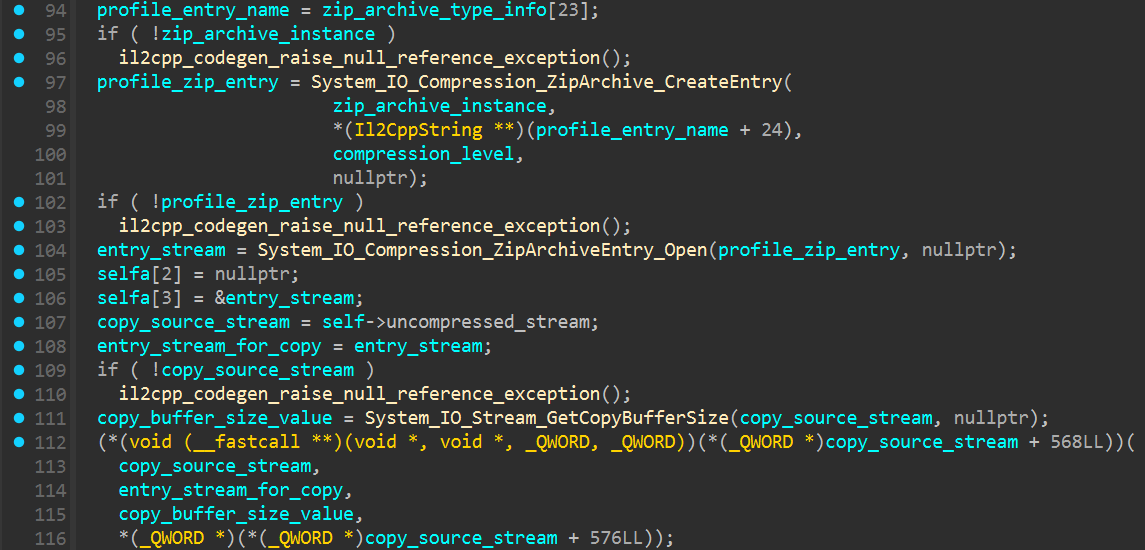 Figure 9. Creation of the
 profile ZIP entry and the following stream copy.
TryEncrypt takes security->encryptor and passes it to EncryptWithTransferBlock. That helper reads from the compressed stream and writes the encrypted bytes to the serializer’s output buffer. The state is then changed to EncryptedCompressProfile. No new cipher is configured here. It reuses the transform already stored in DDVCommon_Security, with the key and settings from above.
I removed the metadata initialization and GC write-barrier code from the snippet below. The checks and calls from the encrypt path are unchanged:
1
2
3
4
5
6
7
8
9
10
11
12
13
14
15
16
17
18
19
20
21
22
23
24
25
26
27
28
29
30
31
32
33
DDV_bool8 Meta_ProfileSerializer_TryEncrypt(
    Meta_ProfileSerializer *self,
    DDVCommon_Security *security,
    void *method_info)
{
    if (!Meta_ProfileSerializer_get_IsInit(self, nullptr))
        return 0;

    if (!security || !security->encryptor)
        return 0;

    if (self->current_compressed_content == Meta_EBufferContent_Invalid)
    {
        return 0;
    }

    void *encryptor_ref = security->encryptor;

    Meta_ProfileSerializer_EncryptWithTransferBlock(
        self,
        &encryptor_ref,
        nullptr
    );

    Meta_ProfileSerializer_UpdateBufferSizes(self, nullptr);
    Meta_ProfileSerializer_set_CurrentUnCompressContent(
        self,
        Meta_EBufferContent_EncryptedCompressProfile,
        nullptr
    );

    return 1;
}
The Python script
I kept the Python side small: one command pulls the JSON out and another puts it back.
--decrypt applies AES-ECB, removes the PKCS#7 padding, opens the ZIP and saves its profile entry as JSON.
--encrypt takes the edited JSON and creates a ZIP containing one entry named profile. It pads that archive and encrypts it with the key recovered from this build.
1
2
3
4
5
6
7
8
9
10
11
12
13
14
15
16
17
18
19
20
21
22
23
24
25
26
27
28
29
30
31
32
33
34
35
36
37
38
39
40
41
42
43
44
45
46
47
48
49
50
51
52
53
54
55
56
57
58
59
60
61
62
63
64
65
66
67
68
69
70
71
72
73
74
75
76
77
78
79
80
81
import argparse
import io
from pathlib import Path
import zipfile

from cryptography.hazmat.primitives import padding
from cryptography.hazmat.primitives.ciphers import Cipher, algorithms, modes

def decrypt_profile(source: Path, destination: Path, key: bytes) -> None:
    ciphertext = source.read_bytes()
    decryptor = Cipher(algorithms.AES(key), modes.ECB()).decryptor()
    padded_zip = decryptor.update(ciphertext) + decryptor.finalize()

    unpadder = padding.PKCS7(128).unpadder()
    zip_data = unpadder.update(padded_zip) + unpadder.finalize()

    with zipfile.ZipFile(io.BytesIO(zip_data), "r") as archive:
        destination.write_bytes(archive.read("profile"))

def encrypt_profile(source: Path, destination: Path, key: bytes) -> None:
    json_data = source.read_bytes()
    zip_buffer = io.BytesIO()

    with zipfile.ZipFile(
        zip_buffer,
        "w",
        compression=zipfile.ZIP_DEFLATED,
        compresslevel=6,
    ) as archive:
        archive.writestr("profile", json_data)

    padder = padding.PKCS7(128).padder()
    padded_zip = padder.update(zip_buffer.getvalue()) + padder.finalize()

    encryptor = Cipher(algorithms.AES(key), modes.ECB()).encryptor()
    ciphertext = encryptor.update(padded_zip) + encryptor.finalize()

    destination.write_bytes(ciphertext)

def create_parser() -> argparse.ArgumentParser:
    parser = argparse.ArgumentParser(description=__doc__)

    operation = parser.add_mutually_exclusive_group(required=True)
    operation.add_argument(
        "--decrypt",
        dest="handler",
        action="store_const",
        const=decrypt_profile,
        help="decrypt a save to JSON",
    )
    operation.add_argument(
        "--encrypt",
        dest="handler",
        action="store_const",
        const=encrypt_profile,
        help="encrypt JSON for use by the game",
    )
    parser.add_argument(
        "input_path",
        type=Path,
        metavar="INPUT",
        help="input file",
    )
    parser.add_argument(
        "output_path",
        type=Path,
        metavar="OUTPUT",
        help="output file",
    )
    return parser

def main() -> None:
    arguments = create_parser().parse_args()
    arguments.handler(
        arguments.input_path,
        arguments.output_path,
        b"b5qhh8saJ8UlDJUzTZXd2Tg6mbo8W8n5",
    )

if __name__ == "__main__":
    main()
Loading the edited save
I did not want to stop at a file that only looked right in a hex editor. In the decrypted JSON, I changed the player level to 41 and set the apple and cookie stacks to 99. Then I rebuilt the save with the script, copied it into the save folder and launched the game.
I still wasn’t sure how the game would react to a ZIP produced by Python instead of its own serializer. It loaded normally. Level 41, two stacks at 99 and no complaint from the profile loader.
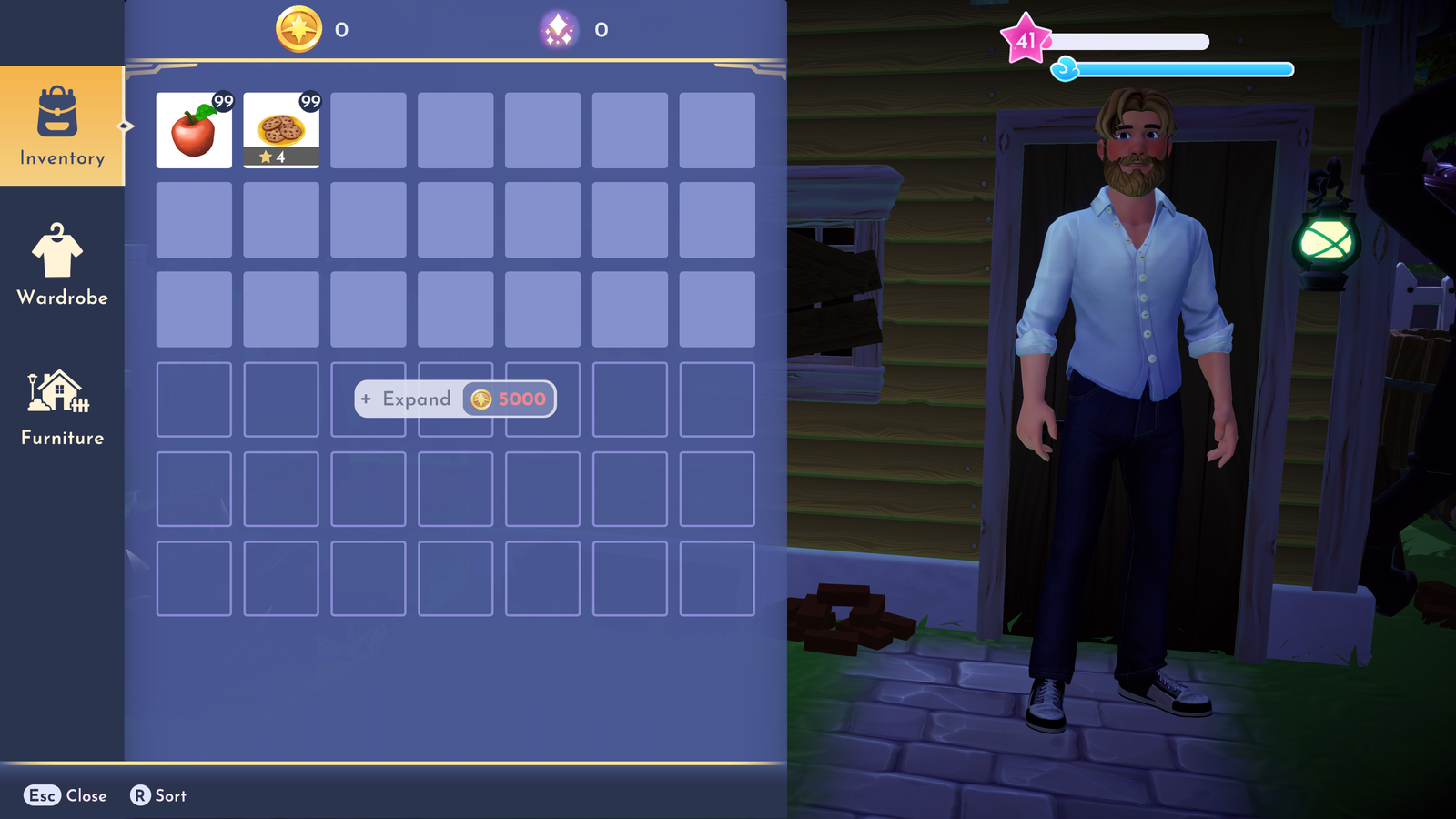 Figure 10. Level
 41 and the two edited inventory stacks after loading the rebuilt profile.
Script
You can grab the script I used here:
Closing notes
I enjoyed working through this one. keychain.json looked useful at first, but the profile path never touched it. In this build, the game reads a fixed 32-byte key from its IL2CPP metadata and configures RijndaelManaged for ECB with PKCS#7 padding.
Under the encryption was a ZIP with one entry named profile. Pull that entry out and the save is ordinary JSON. Build the same layers again and the game can read the edited file.
The in-game check was the part I cared about. It loaded. A fun problem, and I am curious what turns up next.