Understanding Alganon’s QOLPAK10 Archive Format
A closer look at the archive format Alganon uses for most of its game data.

Introduction
This one started with an unpacking request on ResHax. UZ.- was trying to get into Alganon’s .pak files and sent me a few more samples over private messages after I picked it up.
A quick thank you to UZ.- for the request and for sending over the additional archives used here.
Alganon’s servers went offline on November 13, 2017 for what was announced as maintenance and migration. The backend was eventually brought up internally, but the game never returned publicly.
Opening the archive in Archive Lab
I opened Data.pak in Archive Lab and went straight to the first few bytes. QOLPAK10 was written across the start of the file. After that came 42 00 00 00, or 66 in little endian. File count, most likely.
The first name showed up at 0x14: Achievement_categ.xml. Just before it were two numbers, 0x23E and 0x77B. I suspected they were sizes. The name sat in a large block padded with zeroes, then at 0x114 I hit 0x4524. At 0x118 it all started over with another pair of numbers and another name.
That repeat gave me the size of each directory entry: 0x10C bytes.
1
2
3
4
0x000  uint32  stored size
0x004  uint32  uncompressed size
0x008  char    path[256]
0x108  uint32  data offset
I still wanted to know what 0x4524 was pointing at. The header takes up 0x0C bytes and the archive claims to hold 66 entries. A small calculation put the end of the table here:
1
0x0C + (66 x 0x10C) = 0x4524
So 0x4524 was where the first file began. I added its stored size, 0x23E, and landed on the data offset listed for the next file. I checked a few more by hand before running the same check over the full directory. The offsets carried on in order and the final file stopped at EOF.
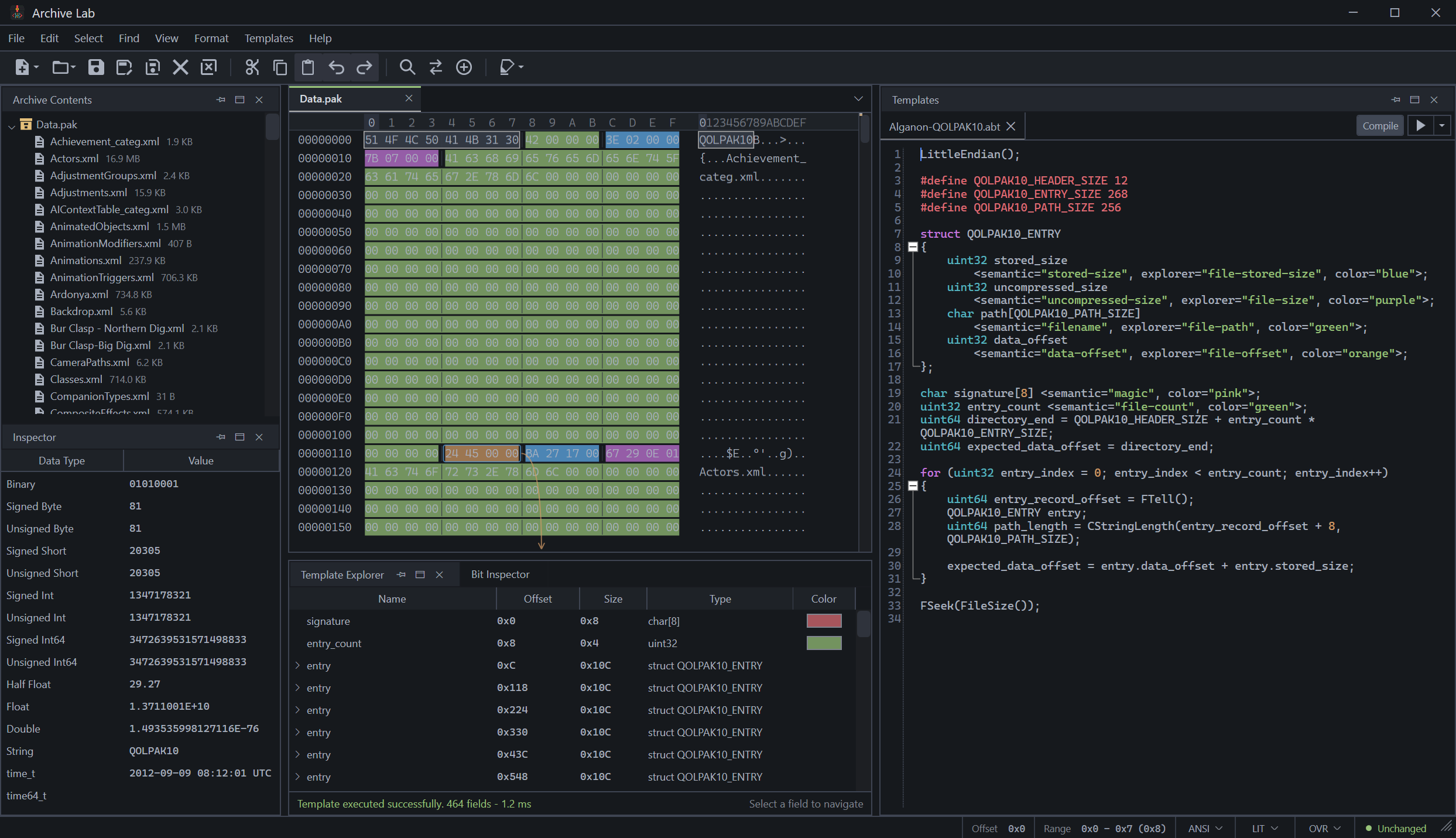 Figure 1.
 Data.pak parsed in Archive Lab with its directory entries listed under Archive Contents.
Finding the compression
The first file began at 0x4524. Both sizes from its directory record appeared again before the payload. There was one extra byte in front of them. I guessed that it held flags.
I found the code that reads these entries by searching Alganon.exe for QOLPAK10. It reads the packed bytes from the recorded offset and hands them to a separate routine. That routine checks the first byte, works out the header length and either unpacks the file or copies it as-is.
The decoder turned out to be QuickLZ 1.5 running at level 3.
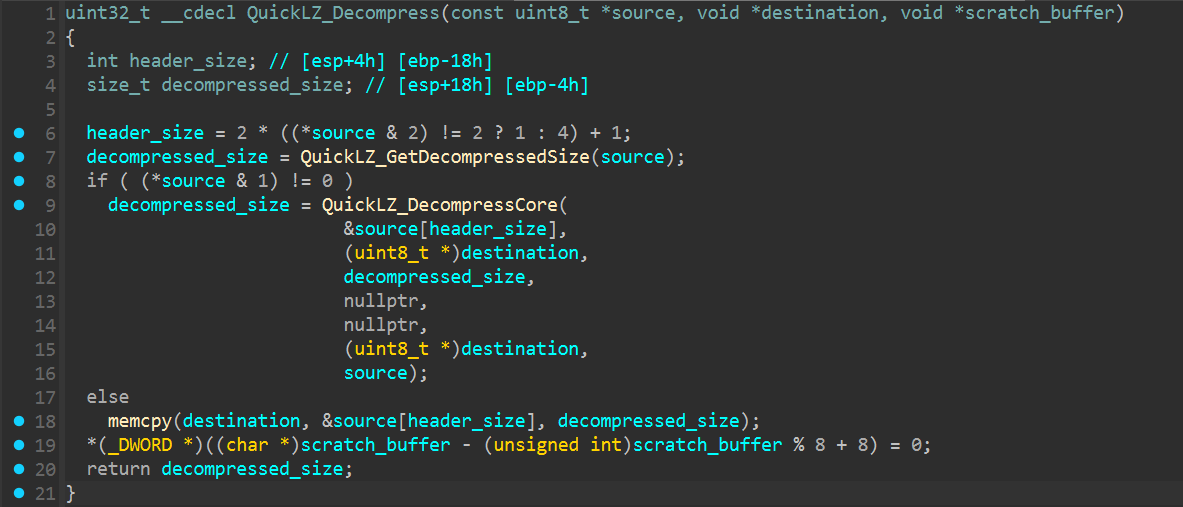 Figure 2.
 QuickLZ_Decompress reading the packet header and choosing between decompression and a direct copy.
Reading an entry
I followed the call into PackageArchive_ExtractFileToMemory next. Once it finds the requested name, the function allocates one buffer for the stored packet and another for the unpacked file.
The fields from the directory record show up here again. The value at +4 sets the output size, while the field at +0x108 is passed to SetFilePointer. The game reads stored_size bytes from that position and sends the buffer straight into QuickLZ_Decompress. No other step in between.
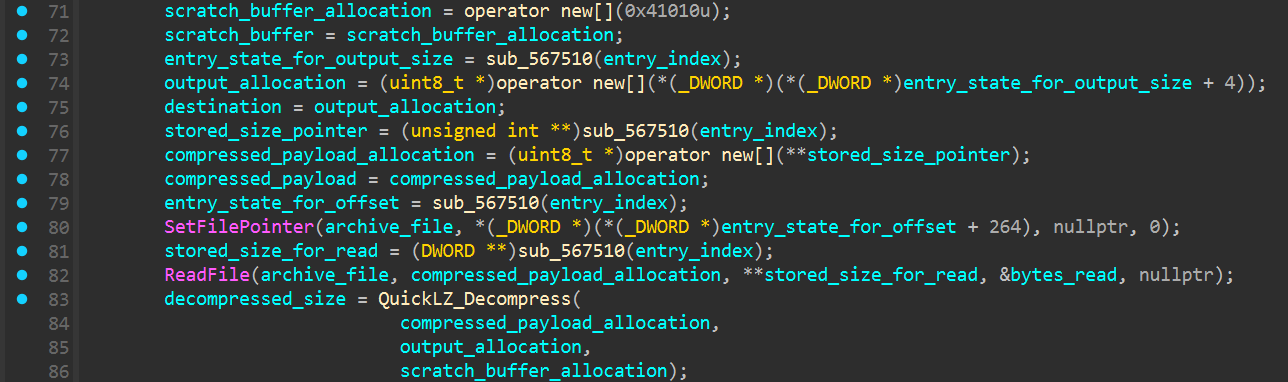 Figure 3. The stored entry is read from its recorded offset and passed to
 QuickLZ_Decompress.
Choosing an archive reader
While checking the remaining .pak files, I ran into a few that began with PK instead of QOLPAK10. They opened normally as ZIP archives, which sent me back to PackageArchive_Open to see how the game handled them.
The function reads eight bytes and compares them with QOLPAK10. If they match, it loads the custom directory. Anything else goes through the 7z/LZMA reader first, then CkZip if that fails.
I never found an archive using the middle path. The files I had were either QOLPAK10 or regular ZIP archives wearing a .pak extension.
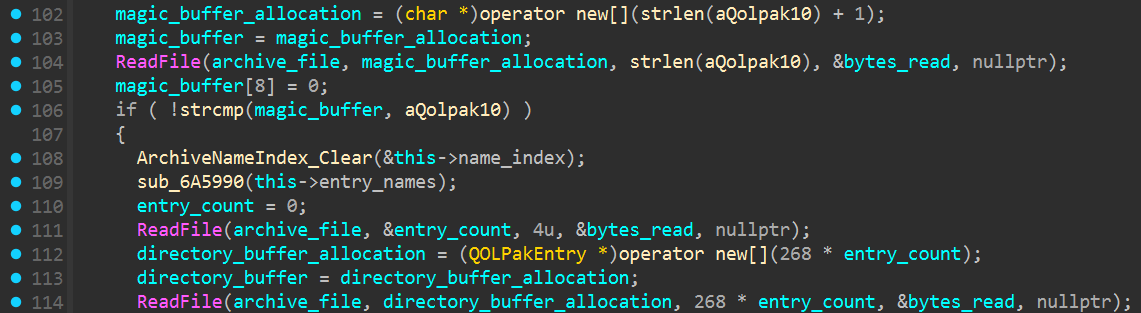 Figure 4.
 PackageArchive_Open checking for QOLPAK10 before reading the custom directory.
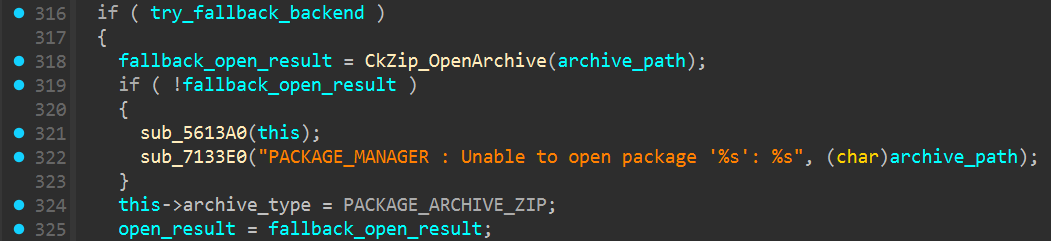 Figure 5. Archives rejected by the earlier readers eventually reach the ZIP backend.
Putting it into a script
I wrote the extractor around the archive signature rather than the .pak extension. Files beginning with QOLPAK10 go through the directory reader and QuickLZ decoder. Regular ZIP archives are handed to Python’s ZIP support instead.
The source archive is opened for reading and left alone. Extracted files go into the output directory supplied on the command line.
The format check itself is short:
1
2
3
4
5
6
7
8
9
with arguments.archive.open("rb") as archive:
    signature = archive.read(8)

if signature == b"QOLPAK10":
    extracted = extract_qolpak(arguments.archive, arguments.output)
elif zipfile.is_zipfile(arguments.archive):
    extracted = extract_zip(arguments.archive, arguments.output)
else:
    raise ValueError("unknown Alganon PAK format")
Run it with an archive and an output directory:
1
python .\alganon_pak.py .\Data.pak .\Data_extracted
Download
I turned the archive code from this post into a standalone extractor. The script and a short usage example are on its project page:
Closing Notes
QOLPAK10 looked like it was going to be the annoying part, but it turned out to be pretty simple. The format puts its name right at the start and keeps a clean file table. Every offset I checked pointed to the right data, so there was not much mystery there. QuickLZ ended up being the only part that needed a bit more digging.
A few .pak files were different and turned out to be normal ZIP archives. Same extension, different format. The game deals with that by trying the available readers until one works.
The extractor does the same thing. It handles QOLPAK10, falls back to ZIP when needed and leaves the original files alone. That was enough for what I wanted to do. No need to wake up a game that has been sleeping since 2017.